Team Permissions
How To Get Here
From the top menu, go to: Settings > Team. Permissions are set in two places:
- on a team member's page (click Manage on their row), and
- on a role's page (Roles tab, then Edit role).
Both use the same permissions editor.
What Are Permissions?
Permissions decide which parts of SellerLegend a team member can open and what they can do there. They come in four kinds:
| Kind | What it is | Example |
|---|---|---|
| Area | A section of the top menu. Switching it on gives everything inside it. | Products, Sales, Supply Chain Management |
| Page | One screen. | Products List, Orders List |
| Action | Something a person can do on a page, such as editing, deleting or downloading. | Product Edit, Customer Edit |
| Panel | One panel on a dashboard. | Best Sellers on the Main Dashboard |
Permissions decide what a person can open. The marketplaces and groups ticked for them decide whose data they see there. A person needs both.
How the Editor Works
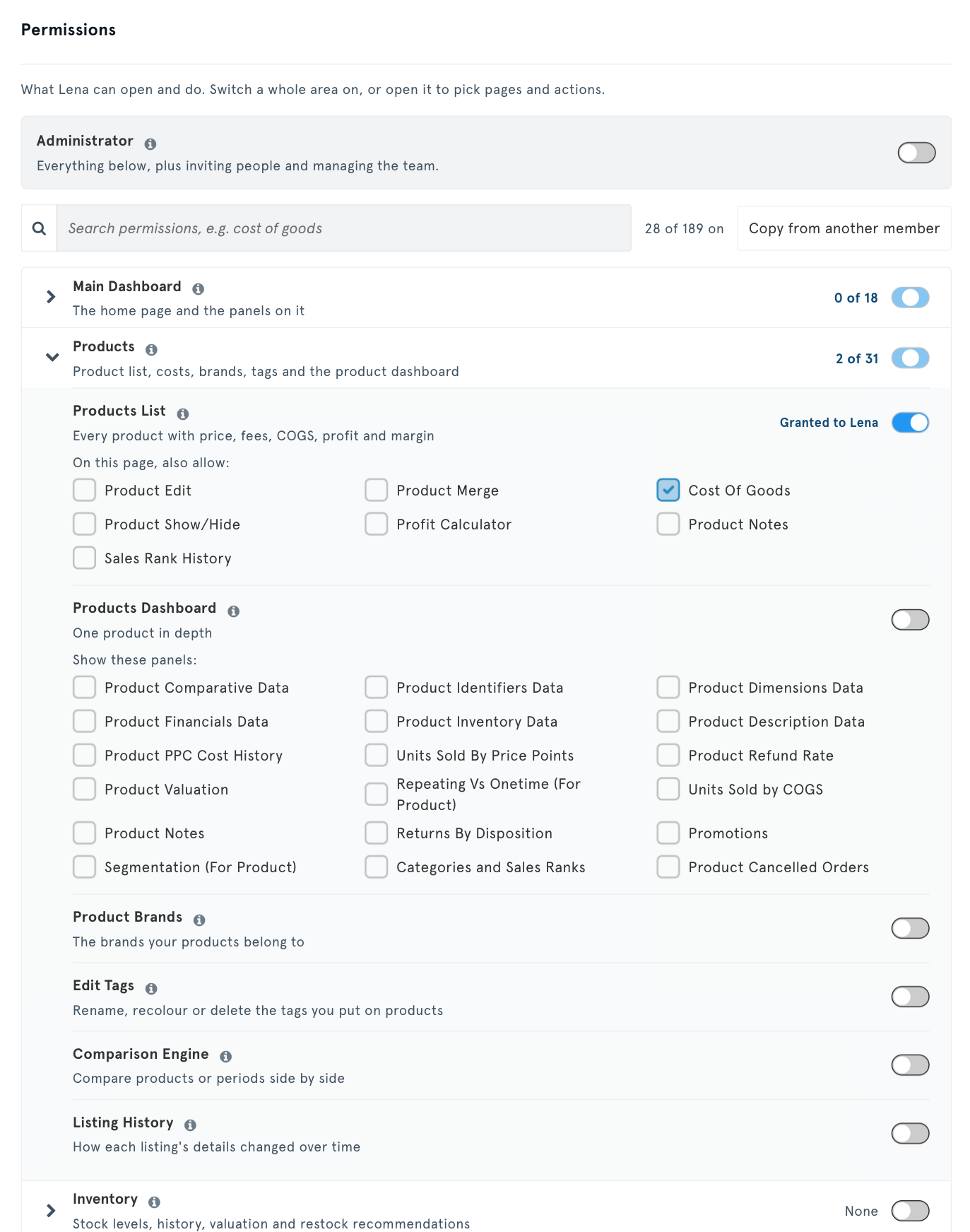
- Each area is a row with a switch. Switch it on to give the whole area, or open it with the arrow to choose inside it.
- Each page in an area has its own switch.
- Actions and panels are tick boxes under the page they belong to.
- The count on an area's row shows how much of it is on: All 18, 2 of 31 or None.
- Search permissions finds a permission by its name or by what it does.
Some rules keep things consistent:
- Ticking an action or a panel also switches on its page and its area, because it is no use without them.
- Switching a page off also switches off the actions and panels under it.
- A permission that comes from a role is shown locked on a member's page, with the role's name. Change it on the role.
Administrator
Administrator is a single switch at the top of the editor. It gives every permission below it on every marketplace, including permissions added in the future, and lets the person invite people, change other members' access and manage roles.
The Info Button
Click the ⓘ after any permission's name to read about it.
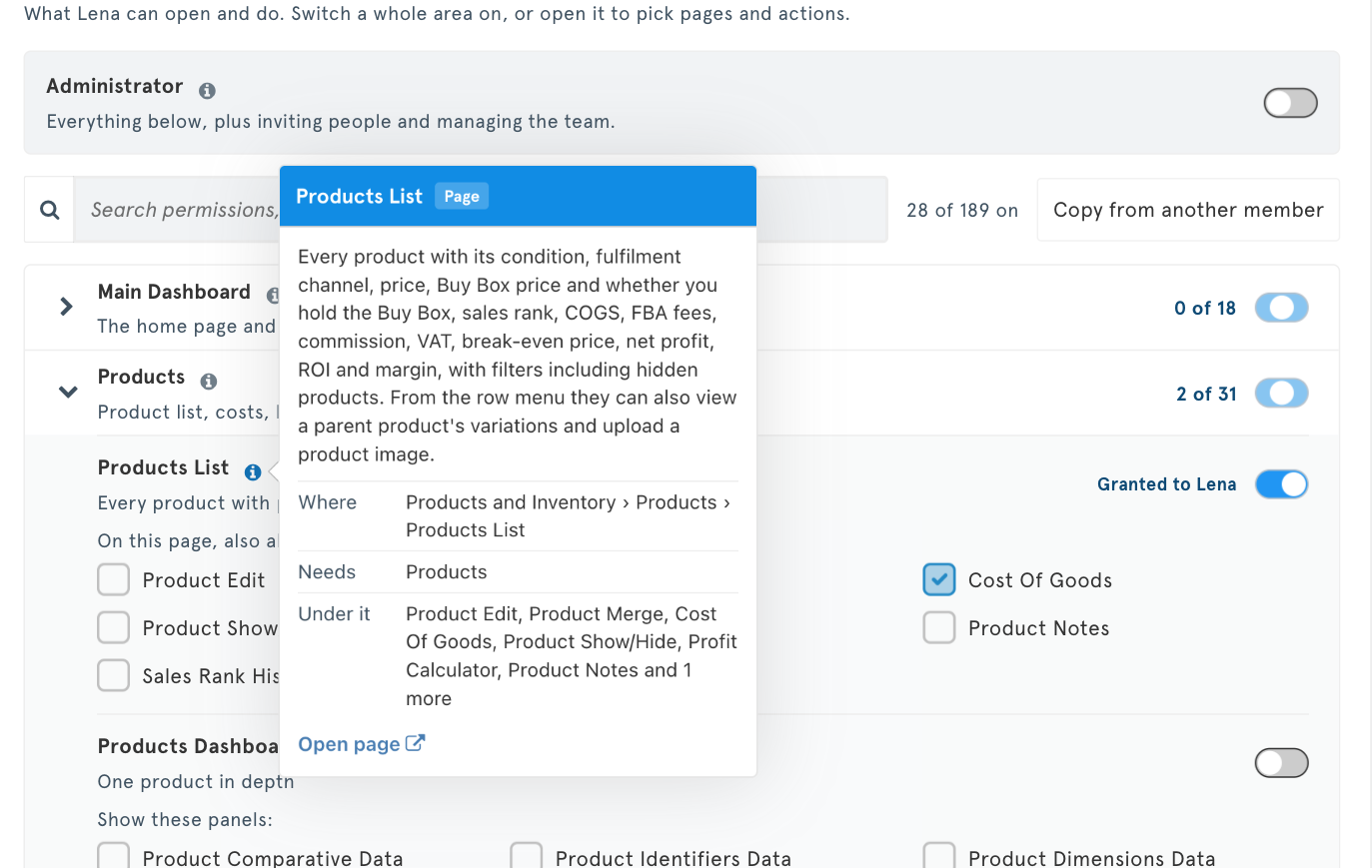
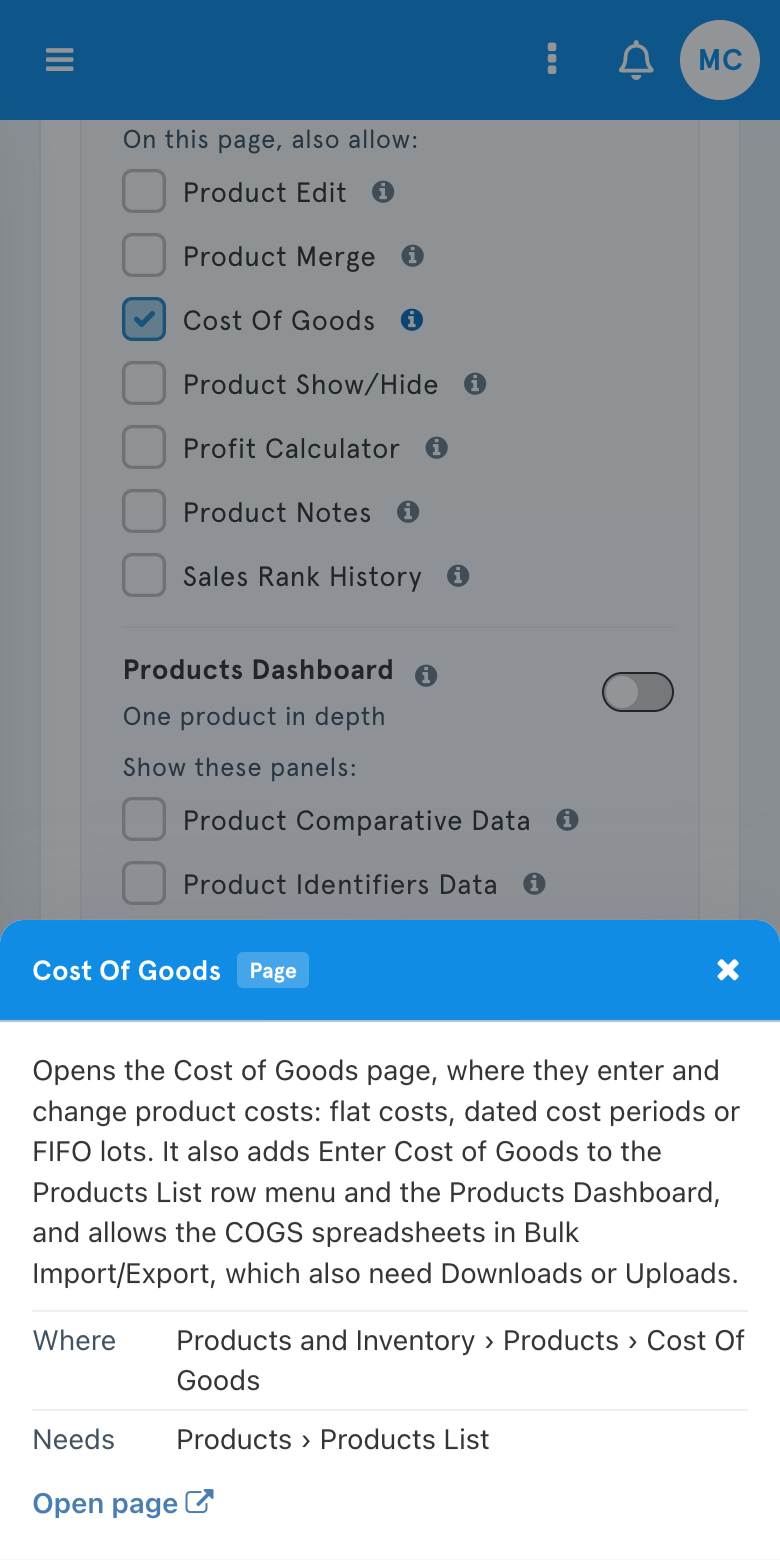
The card tells you:
| Line | What it says |
|---|---|
| Description | What the permission lets the person see and do, in detail. |
| Where | Where that page, action or panel is in SellerLegend. |
| Needs | The permissions that are switched on together with it. |
| Under it | The actions and panels that sit under it. Each of them is a separate permission. |
| Open page | A link that opens the page in a new tab. |
On a phone, the card opens as a panel across the bottom of the screen.
Hints & Tips
- Give a page before worrying about its actions. A person with a page but none of its actions can look but not change anything.
- Dashboard panels are permissions too. If a panel is missing from someone's dashboard, check the panels under Main Dashboard or Products Dashboard.
- Downloads and Uploads (under Reports) are needed for most exports and imports, on top of the permission for the page itself.
- If you are not sure what a permission does, its info card says where to find it. Open that page and compare.
The Full List
These are the permissions you can give to a team member or a role, in the order the editor shows them. Indented rows sit under the row above them.
INFO
The list shows what each permission is for in one line. The info card in the editor has the full description.
Main Dashboard
The home page and the panels on it.
| Permission | Type | What it gives |
|---|---|---|
| Main Dashboard panels | Panels | Pick which panels appear on Main Dashboard |
| ↳ My Accounts | Panel | Your accounts and marketplaces |
| ↳ Best Sellers | Panel | Your top-selling products |
| ↳ Products Positive Trends | Panel | Products with more orders than in the previous period |
| ↳ Products Negative Trends | Panel | Products with fewer orders than in the previous period |
| ↳ My Products | Panel | Your products at a glance |
| ↳ Operating Expenses | Panel | Operating expenses for the selected period |
| ↳ Repeating Vs Onetime Customers | Panel | Repeat customers compared with one-time customers |
| ↳ Cancelled Orders | Panel | Orders that were cancelled |
| ↳ Customer Segmentation | Panel | Customers split by segmentation tier |
| ↳ Promotions | Panel | Promotions with their units, revenue and promo spend |
| ↳ Relative Performance By Marketplace | Panel | Performance compared across marketplaces |
| ↳ Upcoming Restocks | Panel | Reorder dates, quantities and capital needed |
| ↳ Restock Suggestions | Panel | Restock suggestions at a glance |
| ↳ Account Valuation | Panel | Stock value at retail, cash and cost, by account and marketplace |
| ↳ Watchlist Summary | Panel | Each watchlist with the number of customers on it |
| ↳ Returns By Disposition/Reason | Panel | Returns grouped by disposition and reason |
| ↳ Amazon Inventory Recommendations | Panel | Amazon's inventory recommendations |
| ↳ Aged Inventory Surcharge | Panel | Aged inventory surcharge on your stock |
Products
Product list, costs, brands, tags and the product dashboard.
| Permission | Type | What it gives |
|---|---|---|
| Products List | Page | Every product with price, fees, COGS, profit and margin |
| ↳ Product Edit | Action | Edit product settings, one by one, in bulk or by spreadsheet |
| ↳ Product Merge | Action | Merge parent products that have no SKU |
| ↳ Cost Of Goods | Page | Enter product costs, on screen or by spreadsheet |
| ↳ Product Show/Hide | Action | Hide a product, or show a hidden one again |
| ↳ Profit Calculator | Action | Work out a product's profit at a given price |
| ↳ Product Notes | Action | Download the notes kept on products |
| ↳ Sales Rank History | Page | A product's sales rank over time |
| Products Dashboard | Page | One product in depth |
| ↳ Product Comparative Data | Panel | Comparative data for this product |
| ↳ Product Identifiers Data | Panel | Title, ASIN, SKU, FNSKU and other identifiers |
| ↳ Product Dimensions Data | Panel | Item and package dimensions |
| ↳ Product Financials Data | Panel | Price, COGS, Buy Box price, fees and net profit |
| ↳ Product Inventory Data | Panel | In stock, inbound, reserved and the cost tied up in stock |
| ↳ Product Description Data | Panel | The listing's features and description |
| ↳ Product PPC Cost History | Panel | PPC cost history for this product |
| ↳ Units Sold By Price Points | Panel | Units sold at each price point |
| ↳ Product Refund Rate | Panel | This product's refund rate |
| ↳ Product Valuation | Panel | This product's stock value at retail, cash and cost |
| ↳ Repeating Vs Onetime (For Product) | Panel | One-time buyers of this product compared with repeat buyers |
| ↳ Units Sold by COGS | Panel | Units sold at each cost of goods |
| ↳ Product Notes | Panel | Read, add, edit and delete notes on a product |
| ↳ Returns By Disposition | Panel | Returns of this product by disposition |
| ↳ Promotions | Panel | Promotions that included this product |
| ↳ Segmentation (For Product) | Panel | Buyers of this product by segmentation tier |
| ↳ Categories and Sales Ranks | Panel | This product's categories and sales ranks |
| ↳ Product Cancelled Orders | Panel | Cancelled orders for this product |
| Product Brands | Page | The brands your products belong to |
| Edit Tags | Page | Rename, recolour or delete the tags you put on products |
| Comparison Engine | Page | Compare products or periods side by side |
| Listing History | Page | How each listing's details changed over time |
Inventory
Stock levels, history, valuation and restock recommendations.
| Permission | Type | What it gives |
|---|---|---|
| Inventory Dashboard | Page | Current stock for each product, with sales velocity |
| Inventory History | Page | Stock levels day by day |
| Monthly Valuation | Page | What your stock was worth at each month end |
| Restock Recommendations | Page | What Amazon recommends you send in, and when |
| Stranded Inventory | Page | Stock at Amazon without an active listing |
Sales
Orders, settlements, transactions and profit reports.
| Permission | Type | What it gives |
|---|---|---|
| Orders List | Page | Every order with its fees, costs and profit |
| ↳ Shipping Cost | Action | Download and upload the shipping costs of orders |
| ↳ Internal Price | Action | Download and upload internal prices, used as order revenue |
| ↳ Sale Order Notes | Action | Read, add and download notes on orders |
| Removal Orders | Page | Stock you asked Amazon to return or dispose of |
| Settlement Periods | Page | Amazon payouts, period by period |
| Unconfirmed Settlement Periods | Page | Payouts not yet matched to a marketplace |
| Amazon Balance | Page | What Amazon holds for you now, per marketplace |
| Transactions | Page | Every financial event Amazon reports |
| Sales Statistics | Page | Sales totals by day, week or month |
| Sales Per Day Per Product | Page | Daily units and revenue for each product |
| Profit & Loss Report | Page | Income, Amazon fees, costs and net profit |
| Statistics Charts | Page | Revenue, units and orders as a daily chart |
| Sales Heat Map | Page | Units, revenue or profit by hour, across weeks or dates |
Customers
Customer list, watchlist, cross-sell and the geo dashboard.
| Permission | Type | What it gives |
|---|---|---|
| Customers List | Page | Everyone who bought from you |
| ↳ Customer Edit | Action | Add your own name, email, address and alias for a customer |
| ↳ Customers Dashboard | Page | One customer in depth |
| ↳ Customer Details | Panel | Name, email, phone and address |
| ↳ Sales History | Panel | Orders this customer placed |
| ↳ Product Cross-Sell and Customer Lifetime Value | Panel | Products this customer bought, with revenue and profit |
| ↳ Customer Notes | Panel | Read and add notes on a customer |
| ↳ Watchlist Reasons | Panel | Why this customer is on a watchlist |
| Watchlist Reasons | Page | The reasons you can give for watchlisting a customer |
| Customer Cross Sell | Page | Customers who bought several products, with lifetime profit |
| Geo-Dashboard | Area | Sales by location, on a table and a map |
| ↳ Regional Performance | Page | Sales by country, state or city |
Refunds Manager
Returns, refunds and reimbursement claims.
| Permission | Type | What it gives |
|---|---|---|
| Manage Refunds Reimbursements | Page | Refunds to check and claim back from Amazon |
| Returns | Page | Returned units and their condition |
| Reimbursements | Page | What Amazon has paid back |
Reports
Incurred expenses, downloads and uploads.
| Permission | Type | What it gives |
|---|---|---|
| Incurred Expenses | Page | Operating expenses incurred in each period |
| Downloads | Page | Export data as spreadsheets |
| Uploads | Page | Import spreadsheets, such as costs |
Scheduled Reports
Reports exported for you on a schedule.
| Permission | Type | What it gives |
|---|---|---|
| Delete Scheduled Reports | Action | Remove schedules |
| Update Scheduled Reports | Action | Rename, pause or resume schedules |
PPC
Sponsored Products, Brands and Display performance.
| Permission | Type | What it gives |
|---|---|---|
| PPC Dashboard | Action | A PPC Dashboard button on a product's dashboard |
| PPC Comparison Engine | Page | Compare Sponsored Products results or periods |
Sessions
Traffic and conversion by product.
| Permission | Type | What it gives |
|---|---|---|
| Sessions Performance | Page | Sessions, page views and conversion |
| Sessions Report | Action | Upload a sessions report for a single day |
Quality KPIs
Suppressed listings, seller feedback and inbound problems.
| Permission | Type | What it gives |
|---|---|---|
| Suppressed Listings | Page | Listings Amazon has hidden |
| Seller Feedback | Page | Ratings buyers left for you |
| Inbound Noncompliance | Page | Problems with shipments you sent in |
Supply Chain Management
Suppliers, purchase and transfer orders, warehouses and shipments.
| Permission | Type | What it gives |
|---|---|---|
| Download Suppliers And Warehouses | Action | Download suppliers and warehouses as one spreadsheet |
| Upload Suppliers And Warehouses | Action | Upload suppliers and warehouses from one spreadsheet |
| Restock Suggestions | Page | What to reorder from suppliers |
| PDF Download | Action | Download a purchase or transfer order as a PDF |
| Supply Order Notes | Action | Read and write notes on purchase and transfer orders |
| Suppliers | Page | Your suppliers and their contacts |
| ↳ Download Suppliers | Action | Counts towards showing the Import/Export button on supply chain pages |
| ↳ Upload Suppliers | Action | Counts towards showing the Import/Export button on supply chain pages |
| ↳ Suppliers List | Page | The list of your suppliers |
| ↳ Suppliers Modify | Action | Add suppliers and edit their details |
| ↳ Suppliers Delete | Action | Delete a supplier |
| ↳ Suppliers Notes | Action | Read and write notes on suppliers |
| ↳ Assign Supplier | Action | Assign products to a supplier and list them |
| ↳ Supplier Contacts | Action | See the contacts at each supplier |
| ↳ Contact Modify | Action | Add and edit supplier contacts |
| ↳ Delete Contact | Action | Delete a supplier contact |
| ↳ Supplier Mark Archive | Action | Archive a supplier, or bring it back |
| ↳ Supplier Assign Products | Action | Shows the Import/Export button on supply chain pages |
| Purchase Orders | Page | Orders placed with suppliers |
| ↳ Purchase Orders Modify | Action | Create and edit purchase orders |
| ↳ Purchase Orders Delete | Action | Delete a purchase order |
| ↳ Purchase Orders Archive | Action | Archive a purchase order, or bring it back |
| ↳ Purchase Order Note | Action | Download supply order notes (needs Transfer Order Note too) |
| Transfer Orders | Page | Stock moving between warehouses |
| ↳ Transfer Orders Modify | Action | Create and edit transfer orders |
| ↳ Transfer Orders Delete | Action | Delete a transfer order |
| ↳ Transfer Orders Archive | Action | Archive a transfer order, or bring it back |
| ↳ Transfer Order Note | Action | Download supply order notes (needs Purchase Order Note too) |
| Warehouses | Page | Your own and third-party warehouses |
| ↳ Warehouses List | Page | The list of your warehouses |
| ↳ Warehouses Modify | Action | Add warehouses and edit their details |
| ↳ Warehouses Delete | Action | Delete a warehouse |
| ↳ Amazon Warehouses | Page | Amazon fulfilment centres and their addresses |
| ↳ Download Warehouses | Action | Counts towards showing the Import/Export button on supply chain pages |
| ↳ Upload Warehouses | Action | Counts towards showing the Import/Export button on supply chain pages |
| ↳ Warehouse Mark Archive | Action | Archive a warehouse, or bring it back |
| ↳ Warehouse Assign Products | Action | Shows the Import/Export button on supply chain pages |
| ↳ Warehouse Contacts | Action | See the contacts at each warehouse |
| ↳ Warehouse Contact Modify | Action | Add and edit warehouse contacts |
| ↳ Warehouse Delete Contact | Action | Delete a warehouse contact |
| Warehouse Products | Page | Stock held in each warehouse |
| ↳ Inventory Adjustment | Action | Correct the stock count in a warehouse, or by spreadsheet |
| ↳ Inter Warehouse Adjustment | Action | Move stock from one warehouse to another |
| ↳ Inventory Movements Log | Page | The log of stock movements in your warehouses |
| Product Shipments | Page | Shipments from suppliers and warehouses to warehouses or Amazon |
| ↳ Product Shipment Modify | Action | Create and edit shipments |
| ↳ Product Shipment Delete | Action | Delete a shipment |
| ↳ Product Shipment Notes | Action | Read, write and download notes on shipments |
| ↳ Product Shipment Items | Page | See the items and details of a shipment |
| ↳ Product Shipment Item Notes | Action | Read, write and download notes on shipment items |
| ↳ Product Shipments Tracker | Page | The order tracker: each order by stage, draft to FBA check-in |
| Lead Times | Page | Named lead times assigned to suppliers and warehouses |
| ↳ Add Lead Time | Action | Create a lead time |
| ↳ Modify Lead Time | Action | Edit a lead time |
| ↳ Delete Lead Time | Action | Delete a lead time |
Storage Fees
Monthly storage fees and aged inventory surcharge.
| Permission | Type | What it gives |
|---|---|---|
| Monthly Storage Fees | Page | What Amazon charged per product |
| Aged Inventory Surcharge | Page | Fees on stock that has sat too long |
Settings
Account settings, expenses, VAT, product groups, payments.
| Permission | Type | What it gives |
|---|---|---|
| Account Level Settings | Page | Per-account calculation choices, such as using internal prices |
| Notification Settings | Page | Which events you are told about, for which accounts, and where |
| Notifications | Page | See the notifications inbox |
| Operating Expenses | Page | One-time and recurring business costs |
| Customer Segmentation | Action | Tiers that segment customers by orders, units, profit or revenue |
| Europe VAT | Page | VAT registration periods and special VAT rates, Europe and Australia |
| ↳ VAT Download | Action | Download VAT settings as a spreadsheet |
| ↳ VAT Upload | Action | Upload VAT settings from a spreadsheet |
| Product Groups | Page | Combine products into groups for reporting |
| Email Settings | Page | Whether the statistics email comes, how often and to whom |
| Connections | Page | Amazon selling and advertising connections |
| Miscellaneous Settings | Action | Promo-order discount threshold and hiding delisted products |
| Payments | Page | Your plan, invoices and pending charges |
| ↳ Modify Subscription | Action | Start, change or cancel the subscription |
| ↳ Modify Payment Method | Action | Manage payment cards and pay pending charges |
Cash Flow
Money in and out over a period, with a running balance.
One switch: there is nothing to pick inside it.
API Access
Use the API and connect AI apps to your data.
One switch: there is nothing to pick inside it.
See Also
- The Team Screen -- Inviting people and the list of members
- Managing a Team Member's Access -- The member page, section by section
- Team Roles -- Reusable bundles of marketplaces and permissions