FIFO Cost of Goods (Beta) -- Price Sales From Your Purchase Lots
September 23, 2026
Type: New Feature
Overview
When you buy the same product at different prices, a single cost period can't say which batch a sale came from. With FIFO costing, you record each purchase as a lot. SellerLegend then prices your sales from those lots, oldest first, so your COGS, profit and margins follow the stock you are actually selling. FIFO is now available as a beta for the US marketplace only for now, and you can switch it on one product at a time from the Cost of Goods screen.
We'd love your feedback
FIFO costing is in beta, released for the US marketplace only for now, and we are still refining it. Tell our support team how it works for you, or about anything that looks off. Your feedback shapes what comes next.
What's New
FIFO as a Third Costing Method
- Alongside Simple and Detailed cost periods, any product can now use FIFO.
- Each day's sales use up your purchase lots in order, oldest first. A day whose sales span two lots gets a blended cost of both.
- Returns, removal orders, disposals and reimbursed lost units are counted too, so your lots match the stock that actually left.
- FIFO and period-priced products work side by side. Dashboards and the P&L add them up together without any change on your part.
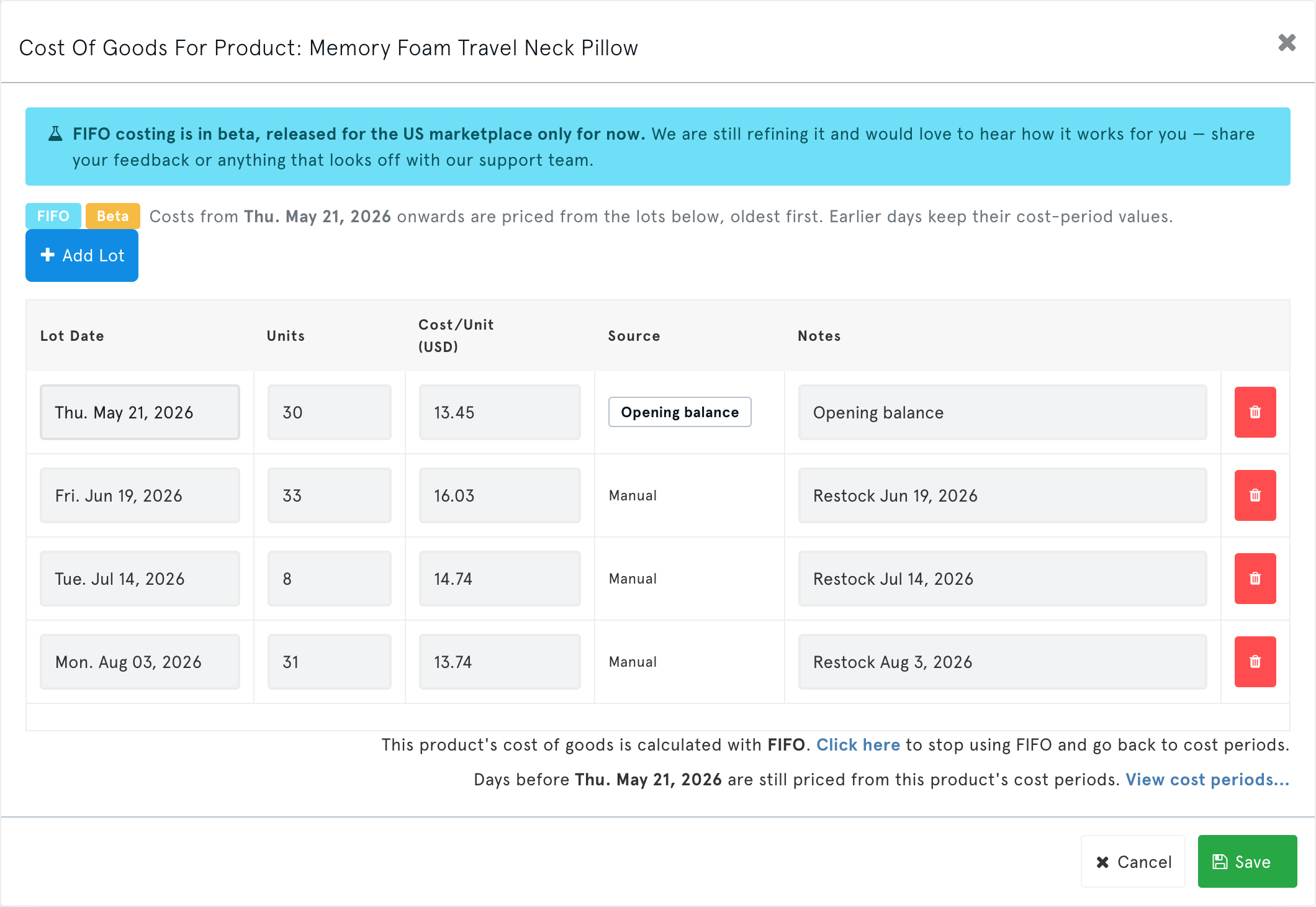
A Purchase Lot Editor
- Record each purchase with its date, units, cost per unit and optional notes.
- Add, edit or delete lots at any time. SellerLegend recalculates the affected days automatically.
- Switching over creates an opening lot from your current stock on hand and current cost, so nothing jumps on the day you switch.
Alerts When Lots Run Out
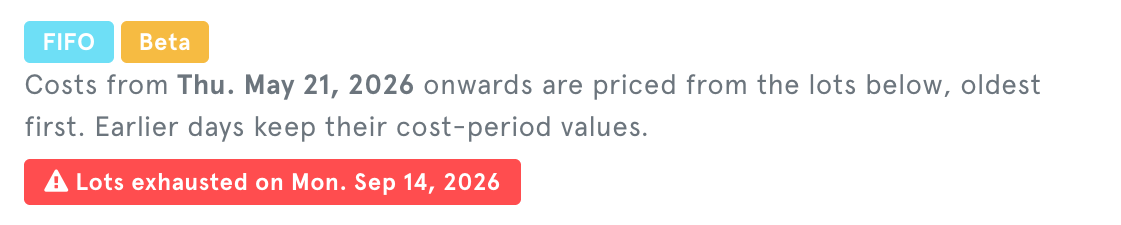
- If sales use up every lot, later days carry the last lot's cost forward, so your COGS never drops to zero.
- The product is then flagged Lots Exhausted in the lot editor, in the COGS Alert column and in the coverage tile, so you know to add the missing purchase.
A Costing Mode Column
- The Cost of Goods screen has a new Costing Mode column (Simple, Detailed or FIFO, marked Beta). Filter it to see every FIFO product at once.
How to Use
Go to Products → Cost of Goods and open a product's Cost of Goods window.
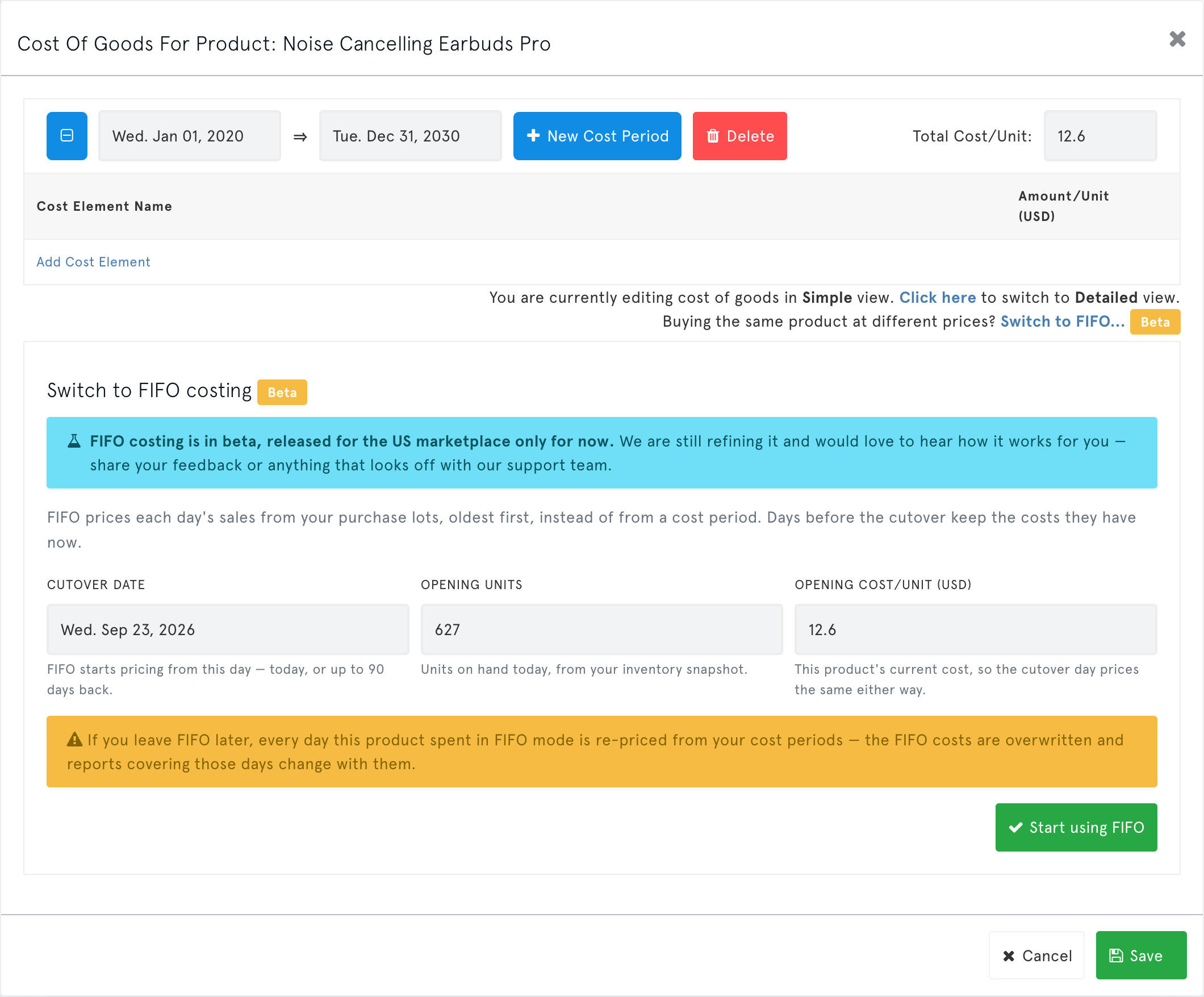
Click Switch to FIFO… (marked Beta).
Confirm the cutover date (today, or up to 90 days back), your opening units and your opening cost per unit. Then click Start using FIFO.
Click Add Lot each time new stock arrives, then Save.
Keep an eye on the COGS Alert column for any Lots Exhausted products.
For the full guide, see FIFO Cost of Goods (Beta).
Benefits
- Accurate margins when costs change: every sale is costed at what you actually paid for that batch.
- No more guessing period dates: record a purchase when it happens instead of predicting when the old stock will run out.
- Safe to try: days before the cutover keep their existing costs, and you can switch a product back to cost periods at any time.
Impact
- No action required. Every product keeps its current costing method until you switch it.
- Bulk COGS import/export does not cover FIFO yet. Rows for FIFO products in an import file are skipped, and the results file says so. Exports list FIFO products with their cost periods only. Manage lots from the product's Cost of Goods window.
- US marketplace only for now. EU marketplaces that share stock (Germany, France, Italy, Spain and the other Pan-European marketplaces) can't switch to FIFO yet, because they need lots shared across countries. Other marketplaces will follow in later releases.
- Leaving FIFO re-prices the days the product spent in FIFO from its cost periods. The confirmation step explains this before anything changes.