Webhook Notifications -- Send Alerts Straight to Your Own Systems
September 17, 2026
Type: New Feature
Overview
SellerLegend notifications can now be delivered to your own systems as they happen. Add a webhook destination (a web address you or your developer control), and every alert you choose -- a lost Buy Box, a suppressed listing, a low-stock warning, a new refund -- is sent there instantly. Use it to post alerts into your team chat, open tickets in your helpdesk, update your own dashboards, or kick off any automation you like.
What's New
A New "Webhook" Channel on the Notifications Screen
- The Notifications settings screen has a new Webhook column next to In App and Email.
- Tick it for any notification type, then choose which destinations should receive that alert.
- Every notification type supports webhooks, including Loss Of Buybox, Listing Changes, Suppressed Listings, Inventory Alerts, Back In Stock Alerts, Returns, Refunds, Excessive Order Quantity, Feedback Notification, Restock Suggestions, Import/Export Report, and Amazon Connections Failure.
Reusable Destinations
- Give each destination a friendly label (for example Ops Slack or Helpdesk) and an
https://address. - Add a destination once and attach it to as many notification types as you like.
- You can have up to 25 destinations on your account.
Secure, Signed Deliveries
- Each destination gets its own signing secret. Every delivery is signed with it, so your system can confirm the message really came from SellerLegend and wasn't changed along the way.
- The secret is shown once, when you create the destination. You can rotate it at any time.
Reliable Delivery
- If your system is briefly unavailable, SellerLegend automatically tries again: up to 5 attempts over roughly 2.5 hours.
- If a destination keeps failing, it is paused automatically so it doesn't pile up errors. The destination list clearly marks it as Auto-disabled, and you can switch it back on with one click once the problem is fixed.
How to Use
Updated October 5, 2026
The Notifications screen now uses Notification Rules. The per-row Webhook checkbox and the Webhook destinations window described when this feature launched have been replaced by the steps below. Webhook destinations you had already set up, and the notifications they were attached to, carried over unchanged.
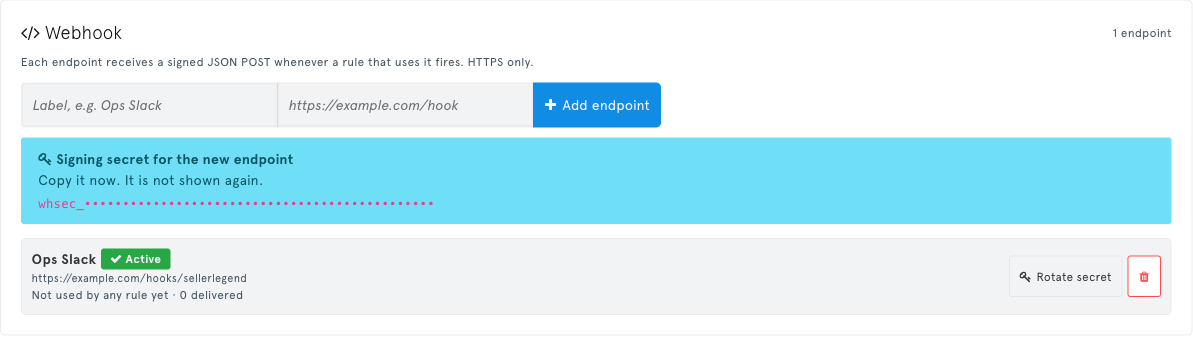
Go to Account Settings → Notifications and open the Destinations tab.
Under Webhook, enter a label and your
https://address, then click Add endpoint.Copy the signing secret now and store it somewhere safe -- it is not shown again. Give it to whoever builds the receiving system.
Open the Rules tab and click New rule (or Edit on an existing rule). Pick the trigger (for example Loss Of Buybox) and the accounts, then on the Destinations step tick Webhook and choose your endpoint. The same endpoint can be used in as many rules as you like.
To manage an endpoint later, go back to the Destinations tab. From there you can:
- Rotate the signing secret -- the new secret is shown once; update your receiving system straight away.
- Re-enable an auto-disabled endpoint.
- Delete an endpoint -- the rules that used it keep running and stop posting to it.
Benefits
- React faster -- alerts reach the tools your team already watches, in real time, instead of waiting in an inbox.
- Automate the follow-up -- open a ticket when a listing is suppressed, reorder when stock runs low, or log every refund automatically.
- One setup, many alerts -- attach a single destination to all the notifications you care about.
- Trustworthy -- signed deliveries mean your system only acts on genuine SellerLegend alerts.
Impact
- Nothing changes unless you turn it on. Your existing In App and Email notification choices stay exactly as they are.
- Destinations must use
https://and be reachable on the public internet. - The receiving system needs a small amount of development work. The section below has everything your developer needs.
For Developers: Receiving Webhooks
The Request
SellerLegend sends an HTTP POST with a JSON body to your destination address.
| Header | Example | Meaning |
|---|---|---|
Content-Type | application/json | Body is JSON |
User-Agent | SellerLegend-Webhooks/1.0 | |
X-SellerLegend-Event | sl.loss_of_buybox | Event type |
X-SellerLegend-Event-Id | evt_2f6c1b9e-... | Unique per event. The same on every retry. |
X-SellerLegend-Delivery | dlv_Q3mX8rT2vLp9sK4wN7bY1cZa | Unique per delivery attempt |
X-SellerLegend-Webhook-Id | 1 | The destination that was called |
X-SellerLegend-Signature | t=1789631146,v1=5c1f0e9a... | Timestamp and signature (see below) |
Header names are case-insensitive. Some frameworks and proxies rewrite them, for example to X-Sellerlegend-Signature.
Body:
{
  "event_id": "evt_2f6c1b9e-5d0a-4c8e-9a51-2b7f0e6d3c11",
  "event_type": "sl.loss_of_buybox",
  "emitted_at": "2026-09-17T07:45:46+00:00",
  "account": {
    "id": 12345,
    "seller_id": "A1EXAMPLE",
    "marketplace": "ATVPDKIKX0DER",
    "currency": "USD"
  },
  "notification_type": "Loss Of Buybox",
  "data": { },
  "links": {
    "in_app": "https://app.sellerlegend.com/notifications/index"
  }
}event_typeissl.followed by the notification name in lowercase, with spaces and punctuation turned into underscores. For example, Loss Of Buybox becomessl.loss_of_buybox, and Inventory Alerts (on days) becomessl.inventory_alerts_on_days.account.marketplaceis the Amazon marketplace ID.dataholds the details of the alert. Its fields depend on the notification type.
Verifying the Signature
Always verify the signature before you trust a delivery. The header looks like this:
X-SellerLegend-Signature: t=1789631146,v1=5c1f0e9a7d3b2e64c8a1f05b9e7d2c4a6b8f1e3d5c7a9b0e2f4d6c8a1b3e5f7dtis the Unix timestamp (in seconds) when the delivery was signed.v1is a hex-encoded HMAC-SHA256. The key is your signing secret and the message is<t>.<raw request body>.
To verify:
- Read the raw request body exactly as received, before any JSON parsing.
- Split the header on
,and then on the first=, to gettandv1. - Build the signed message: the value of
t, a literal., then the raw body. - Compute the HMAC-SHA256 of that message. Use your entire signing secret as the key, including the
whsec_prefix. Hex-encode the result. - Compare your result with
v1using a constant-time comparison. - Reject the delivery if
tis more than 5 minutes away from your server's current time. This stops an intercepted request from being replayed later.
Use the raw body
Compute the signature over the body bytes you received, not over JSON you have parsed and re-encoded. Re-encoding changes spacing, key order or escaping, and a genuine delivery will then fail verification. Most web frameworks parse JSON automatically, so turn that off (or keep a copy of the raw body) on your webhook route.
Every attempt, including a retry, is signed again with a fresh timestamp, so the 5-minute window never rejects a legitimate retry.
Node.js (Express)
const crypto = require('crypto');
const express = require('express');

const SECRET = process.env.SELLERLEGEND_WEBHOOK_SECRET; // whsec_...
const TOLERANCE_SECONDS = 300;

function verifySellerLegendSignature(rawBody, header, secret, now = Math.floor(Date.now() / 1000)) {
  if (!header) return false;

  const parts = {};
  for (const item of header.split(',')) {
    const i = item.indexOf('=');
    if (i > 0) parts[item.slice(0, i).trim()] = item.slice(i + 1).trim();
  }
  if (!/^\d+$/.test(parts.t || '') || !parts.v1) return false;

  if (Math.abs(now - Number(parts.t)) > TOLERANCE_SECONDS) return false;

  const expected = crypto
    .createHmac('sha256', secret)
    .update(`${parts.t}.`)
    .update(rawBody) // Buffer, exactly as received
    .digest('hex');

  const a = Buffer.from(expected, 'utf8');
  const b = Buffer.from(parts.v1, 'utf8');
  return a.length === b.length && crypto.timingSafeEqual(a, b);
}

const app = express();

// express.raw keeps req.body as a Buffer, so the signature is checked over the exact bytes.
app.post('/webhooks/sellerlegend', express.raw({ type: 'application/json' }), (req, res) => {
  if (!verifySellerLegendSignature(req.body, req.get('X-SellerLegend-Signature'), SECRET)) {
    return res.status(400).send('Invalid signature');
  }

  const event = JSON.parse(req.body.toString('utf8'));
  res.sendStatus(200); // acknowledge quickly, then do the work
  handleEvent(event);  // your code; skip events whose event_id you've already processed
});

app.listen(3000);
Python (Flask)
import hashlib
import hmac
import os
import time
from typing import Optional

from flask import Flask, abort, request

SECRET = os.environ["SELLERLEGEND_WEBHOOK_SECRET"]  # whsec_...
TOLERANCE_SECONDS = 300

app = Flask(__name__)


def verify_sellerlegend_signature(raw_body: bytes, header: str, secret: str, now: Optional[int] = None) -> bool:
    if not header:
        return False

    parts = dict(item.strip().split("=", 1) for item in header.split(",") if "=" in item)
    timestamp, signature = parts.get("t", ""), parts.get("v1", "")
    if not timestamp.isdigit() or not signature:
        return False

    now = int(time.time()) if now is None else now
    if abs(now - int(timestamp)) > TOLERANCE_SECONDS:
        return False

    expected = hmac.new(
        secret.encode("utf-8"),
        timestamp.encode("utf-8") + b"." + raw_body,
        hashlib.sha256,
    ).hexdigest()
    return hmac.compare_digest(expected, signature)


@app.post("/webhooks/sellerlegend")
def sellerlegend_webhook():
    raw_body = request.get_data()  # raw bytes, before JSON parsing
    if not verify_sellerlegend_signature(raw_body, request.headers.get("X-SellerLegend-Signature", ""), SECRET):
        abort(400)

    event = request.get_json()
    handle_event(event)  # your code; keep it fast or hand it to a background job
    return "", 200
PHP
<?php

const TOLERANCE_SECONDS = 300;

function verify_sellerlegend_signature(string $raw_body, string $header, string $secret, ?int $now = null): bool
{
    $parts = [];
    foreach (explode(',', $header) as $item) {
        $pair = explode('=', $item, 2);
        if (count($pair) === 2) {
            $parts[trim($pair[0])] = trim($pair[1]);
        }
    }

    $timestamp = $parts['t'] ?? '';
    $signature = $parts['v1'] ?? '';
    if (!ctype_digit($timestamp) || $signature === '') {
        return false;
    }

    if (abs(($now ?? time()) - (int) $timestamp) > TOLERANCE_SECONDS) {
        return false;
    }

    $expected = hash_hmac('sha256', $timestamp . '.' . $raw_body, $secret);
    return hash_equals($expected, $signature);
}

$secret   = getenv('SELLERLEGEND_WEBHOOK_SECRET'); // whsec_...
$raw_body = file_get_contents('php://input');      // raw bytes, before json_decode
$header   = $_SERVER['HTTP_X_SELLERLEGEND_SIGNATURE'] ?? '';

if (!verify_sellerlegend_signature($raw_body, $header, $secret)) {
    http_response_code(400);
    exit('Invalid signature');
}

$event = json_decode($raw_body, true);
http_response_code(200);
// handle $event here; skip events whose event_id you've already processed
Keeping the Secret Safe
- Store the signing secret like a password: in an environment variable or a secrets manager. Never put it in source code, front-end code, logs or tickets.
- If the secret may have been exposed, rotate it from the Destinations tab of the Notifications screen.
- Rotation takes effect immediately: from that moment, deliveries are signed only with the new secret. Update your receiver right away. Deliveries that fail in the meantime are retried, and each retry is signed with the new secret, so updating within the retry window loses nothing.
- Each destination has its own secret. Look up the right one using the
X-SellerLegend-Webhook-Idheader if one receiver handles several destinations.
Responding and Retries
- Reply with any 2xx status within 10 seconds (5 seconds to connect). The response body is ignored.
- Anything else counts as a failure: a non-2xx status, a timeout, a connection error, or a redirect (redirects are not followed).
- A failed delivery is retried roughly 1 minute, 5 minutes, 30 minutes and 2 hours after each failure, for up to 5 attempts in total.
- If you reply 429 with a
Retry-Afterheader, the next attempt waits for the time you asked for. - Do slow work (database writes, calls to other services) after responding, or in a background job, so deliveries don't time out.
Handling Duplicates
A retry carries the same event_id as the original attempt. A delivery can occasionally arrive twice, for example if your server processed it but the response was lost. Record the event_ids you have processed and skip any you have already seen. X-SellerLegend-Delivery changes on every attempt, so don't use it for this.
Automatic Disabling
A destination is auto-disabled when either of these happens:
- all 5 attempts for a single delivery fail, or
- more than half of its last 50 deliveries fail.
It is also disabled straight away if its address stops resolving to a public internet address. While a destination is auto-disabled, nothing is sent to it. Fix the problem on your side, then click Re-enable on the Destinations tab of the Notifications screen. Its failure history is cleared when you re-enable it.
Testing Tips
- For a first test, point a destination at a request inspector you control. It must be reachable over public
https://. - Log the raw body and headers of your first few deliveries, and check that your verification code accepts them.
- Change a single character of the body or the secret and confirm that verification fails.